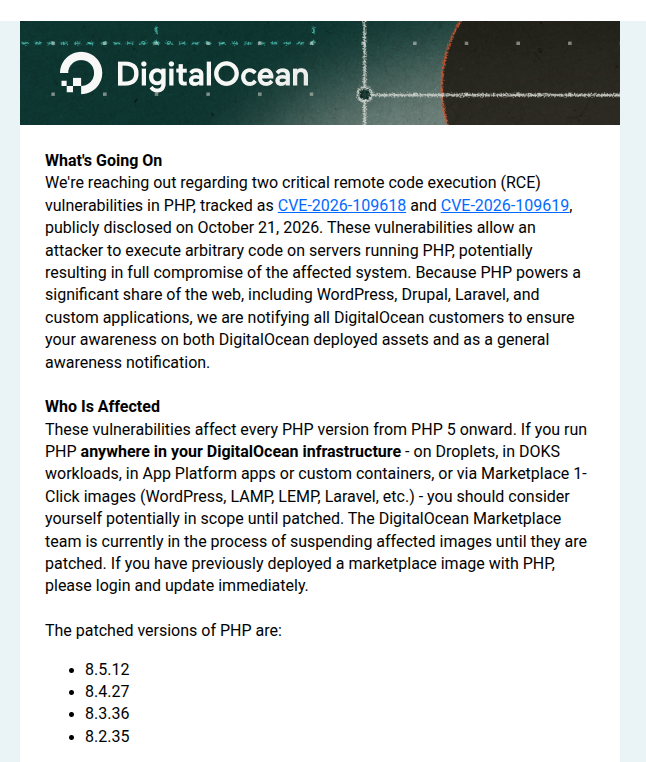
A parish church website was running on a single cloud droplet with a stack that had quietly gone end-of-life: PHP 7.3, WordPress 6.6.2, MariaDB 10.4. That part is common. What made it urgent was the 2026 “php2shell” set of pre-auth PHP remote-code-execution vulnerabilities (GHSA-w8hw-w9fx-j79w, GHSA-6wmf-4rv5-p3rp). On a supported PHP there is a patch. On PHP 7.3 there is no patch, because 7.3 is past end-of-life and upstream stopped shipping fixes. The only real remediation was to get off that stack entirely.
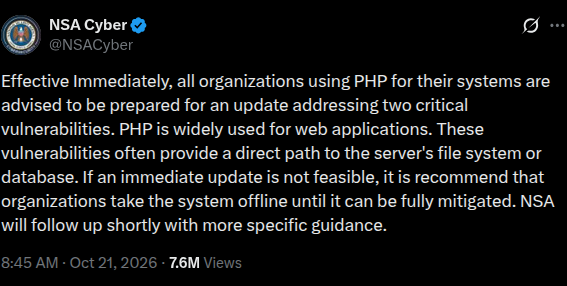
The advisory was not subtle. NSA Cyber put out a public warning telling organizations to be ready to update, and that if an immediate update was not feasible, taking the system offline was the recommendation.
So we moved the site home onto the same cluster that already serves the other sites, published through the same edge. This is the record of that move: the commands, the redirect loops, and the parts that bit us.
TL;DR
byzantinela.com ran on a single droplet with PHP 7.3.17, WordPress 6.6.2, and MariaDB 10.4 - an end-of-life stack carrying a pre-auth RCE with no upstream fix. We rebuilt it on WordPress 7.1.3, PHP 8.3.36, and MariaDB 11.4 inside the home k3s cluster, exposed it through the same frp edge as the other sites, and held the old droplet as rollback. Zero inbound ports at home, DNS stays on Route53, and the running code is always a build of a commit. The interesting parts were not the WordPress upgrade. They were the plumbing around it. The migration goal is met - off EOL PHP 7.3 and the pre-auth RCE, on a modern patched stack - but the site is not faster, and the post is honest about why.
The stack we were leaving
The production box was a DigitalOcean droplet running OpenLiteSpeed with PHP 7.3.17, MariaDB 10.4, and WordPress 6.6.2. DigitalOcean notified every customer about the two CVEs and was explicit: patches exist only for supported PHP versions, 8.2 and later. Running 8.1 or earlier meant no official patch and an immediate upgrade.
The code was a clean git checkout of the parish repo - the working tree matched a commit, which we confirmed by matching tree hashes, per-area file counts (15,455 files), and sample file hashes. That mattered later, when two histories turned out to disagree.
There was a stopgap patch to wp-login.php sitting in the tree to blunt an XSS, but a stopgap is not a fix. The vulnerability class was in PHP itself, and the version was dead.
The target was simple to state and fiddly to execute: WordPress 7.1.3, PHP 8.3.36, MariaDB 11.4, in the home k3s cluster, with the public face on the edge.
The shape we moved to
Same architecture as the other sites. The edge terminates TLS and runs the tunnel terminator; the home side dials out, so nothing inbound is opened at the house.
flowchart LR
    PUB["https://byzantinela.com"] --> RT53["Route53 A record"]
    RT53 --> HUB["edge box (hub)
nginx TLS + certbot + frps"]
    HUB -->|"frp tunnel, dials out"| TR["home Traefik"]
    TR --> WEB["byzantinela pod
nginx + php-fpm, WordPress"]
    WEB --> DB["byzantinela-db pod
MariaDB 11.4"]
The edge is an EC2 t4g.small already paid for as a three-year Reserved Instance, so the compute is sunk capacity rather than a new bill. It terminates TLS with nginx and certbot and runs frps. The home side runs frpc as a Deployment that dials out to the edge; the edge forwards traffic back down the tunnel to Traefik and then to the pod. All DNS stays in Route53. The router never gets a port forward, and the home IP is never exposed.
The exposure story was already proven on the static and Django sites, so it was not the risky part. The WordPress-specific parts were.
“The repo is the site”
The central design decision: the git repo holds the full WordPress tree - core plus wp-content - the container image is a build of the repo, and content lives in the database and media volumes. Code is version-controlled; content is not.
The Dockerfile starts from wordpress:php8.3-fpm, adds nginx and wp-cli, and copies the whole tree in. Local development mounts the repo. The cluster does the opposite: a read-only code filesystem, writable uploads on a PVC, and DISALLOW_FILE_MODS on so WordPress cannot update itself in place. Every deploy is a build of a commit, and the running code is always that build. No one edits a plugin on the server, because the server cannot write to the code.
That constraint is the whole point. It is also what makes the upgrade path testable, which is the part people underestimate.
You cannot eyeball a WordPress upgrade
A core or plugin bump can change markup, break a form, or quietly drop a schema field. “It looks fine” is not a test. So we built a layered regression harness, all under deploy/, driven by one entry point:
deploy/run-tests.sh <label>
It runs every layer and saves a timestamped snapshot to deploy/smoke/<label>-<ts>.txt. The layers:
- Smoke test - 26 curated URLs plus the login form, checking HTTP status, response size, and content markers (
eventon_list_event,ngg-,wpcf7-form,St. Mary) plus a PHP-error scan. - Full crawl - every page, every event, and a sample of random posts (default 25).
- Admin screens - logs in and checks that 13
wp-adminscreens actually render their content, not just return 200. - Functional test - a non-destructive Contact Form 7 submission with invalid data, expecting
validation_failedand no mail sent. - SEO assertions - 15 Yoast head, schema, and sitemap checks.
- Render diffs - normalized HTML of 15 pages, captured before and after a step and diffed. This is the one that earns its keep: a plugin bump that changes markup shows up as a diff even when every status code is green.
There was a small bug in the harness worth recording: printf | grep -q under set -o pipefail fails intermittently with SIGPIPE, so we switched to here-strings. A flaky test is worse than no test.
The migration itself followed one rule: one change at a time. Before each step, a database snapshot and a git rollback point. Then the upgrade, then the full plan, then a commit. The upgrade list was ordered low-risk to high-risk, so a failure late in the sequence still left a working site.
The gotchas
This is the part that looks easy on a diagram. Each one is a mundane, real problem, and each one cost real time.
Redirect loop number one: the port
WordPress kept redirecting in a loop. The cause was nginx’s Debian fastcgi_params, which sets HTTP_HOST to $host - and $host drops the port. WP_HOME and the request host disagreed, so WordPress “corrected” the URL forever. The fix is one line:
fastcgi_param HTTP_HOST $http_host;
Redirect loop number two: TLS terminated upstream
The second loop was the same symptom, a different cause. The frp edge terminates TLS, so the pod sees plain HTTP. WordPress’s home URL is https, so it saw an HTTP request for an HTTPS site and redirected https -> https forever. You have to tell WordPress it is behind TLS. We handled it with a small mu-plugin that forces HTTPS for the public hosts:
// wp-content/mu-plugins/host-alias.php
// The pod sees plain HTTP behind the edge; tell WP it is behind TLS.
Why a filter did not fix the assets
After the URL switch, core assets loaded from the new domain but theme and plugin assets kept loading from the old one. The reason is that WP_CONTENT_URL is baked from site_url at startup, before any plugin filter runs. A filter that rewrites the URL runs too late for content URLs.
The real fix is not a filter. It is switching the root URL in the database:
wp search-replace 'https://old-domain.example' 'https://new-domain.example' \
  --all-tables-with-prefix --precise
That touched 17,122 rows. The database is the single source of truth for the site URL; filters are a trap here.
A single-replica MariaDB on a ReadWriteOnce PVC
The database is one replica on a ReadWriteOnce volume. A normal rolling update started the new pod before the old one had released the data directory, and MariaDB refused to start: Can't lock aria control file. The fix is to stop pretending a single-writer database can roll:
strategy:
  type: Recreate
Brief downtime on a database restart is fine. A corrupt-looking data directory is not.
197,289 users, of which 197,252 were spam
The user table had 197,289 rows. A flood between 2021 and 2025 had created 197,252 spam accounts. The obvious keep signal “has logged in” does not work, because the spam accounts logged in too. The reliable signal was “has a first or last name,” plus administrator, plus “authored a post.” That kept 37 real people.
WordPress has no foreign keys, so before deleting anything we verified that no content table referenced a non-keep user with zero orphans. Then deleted 197,252 users and 2.96 million usermeta rows from both the local and cluster databases, with backups and the keep-list exported first. The 37 were reviewed and approved by hand.
The security pass
Before the domain went public, a fresh-context agent did a read-only assessment. It found: XML-RPC open, REST and ?author= username enumeration, no brute-force limiting on login, no HSTS, containers running as root with full capabilities, and a stored-XSS upload flag. All of it was fixed before exposure - block XML-RPC at the edge and app, block anonymous REST user enumeration, block ?author= before redirect_canonical, rate-limit wp-login.php at the edge, add HSTS and security headers, drop capabilities and set a seccomp profile with allowPrivilegeEscalation: false, turn off ALLOW_UNFILTERED_UPLOADS, deny PHP execution in uploads, disable server tokens, and block install.php.
None of this is exotic. That is the point - it is the ordinary friction of running a real web application, and it is exactly the kind of work an agent absorbs.
Owning versus renting
The whole point was to own the stack rather than rent it. The tradeoffs are real and worth stating plainly.
We own the edge (a paid Reserved Instance), the DNS (Route53), and the WordPress install. The upside is control and cost: the edge compute is already paid for, and there is no per-site hosting bill. The downside is that we now own the operational surface - TLS renewal, the tunnel, the cluster, and the database. A vendor portal would have absorbed some of that.
The tunnel design buys a specific property: zero inbound exposure at home base.
What it costs in milliseconds
The migration had one goal: get off an unpatched, end-of-life stack. It did not have a goal of being faster, and it is not. Here is the honest before/after, run against the same harness with the same parameters.
The path changed shape. Before, a request went straight to the droplet. Now it goes client -> AWS edge -> frp tunnel -> home, which adds roughly 200-300 ms per round trip (the RTT to the edge is about 77 ms just to connect). That is the architecture, not the origin - it is the price of the tunnel that keeps the house closed.
The end-to-end k6 numbers are all slower (a static asset went 60 -> 262 ms, the home page 183 -> 399 ms), but that test is tunnel-confounded: it measures the hairpin, not the stack. It is not a clean comparison and I am not going to pretend it is.
The path-independent numbers are Lighthouse, run against the origin:
| metric | before | after |
|---|---|---|
| performance score | 65 | 61 |
| server response | 190 ms | 410 ms |
| LCP | 2.5 s | 4.5 s |
| total blocking | 50 ms | 140 ms |
| page weight | 2405 KiB | 3372 KiB |
Desktop is roughly flat (59-65 before, 60-64 after). Mobile dropped hard (50-62 -> 27-46). That is not a rounding error.
The one actionable finding is page weight: it grew by about 1 MiB. The request count is identical (78), but the new stack loads theme and plugin CSS and JS as separate files - bootstrap.css (193 KiB), eventon_styles.css (190 KiB), handlebars.js (176 KiB), FontAwesome all.css (154 KiB), bootstrap.js (132 KiB) - that the old host had combined and minified. The old box ran OpenLiteSpeed, which does CSS/JS combine and minify in-engine; nginx does not. Neither side had a minify plugin active. That is most of the mobile regression, and it is fixable: fast-velocity-minify is already installed (just inactive), or nginx can do the work.
The verdict, honestly: the migration goal is met - off EOL PHP 7.3 and the pre-auth RCE, on a modern patched stack, with a healthy origin (admin screens around one second after a CPU fix). End-to-end latency is higher by design; that is the cost of owning the stack rather than renting it. The front-end weight is the real regression, and it is the kind of thing you inherit when you leave a host that was quietly optimizing for you.
The handoff
The people who run the parish are not engineers. So the deliverable was not just a working site; it was a document. docs/OWNER-HANDOFF.md covers the architecture, how to change content versus code, how to build and deploy, how to take and restore backups, how to check health and read logs, where the secrets live, and how to cut over and roll back. It includes the exact backup and restore commands, because “restore the database” is not an instruction a non-engineer can follow.
The site is immutable by design, so content changes need no deploy and code changes need a rebuild. That split is the thing the owners actually need to understand.
What I’d do differently
- Start on local disk. We lost time to CIFS latency that we could have avoided by never serving code off the NAS in the first place.
- Untrack the junk properly the first time.
.gitignorealone does not untrack; we should have rungit rm --cachedin the same pass. - Handle the site URL in the database from day one. We chased a filter-based fix for the asset URLs before accepting that
WP_CONTENT_URLis baked at startup. Thesearch-replacewas always the answer. - Set the database strategy and probe timeouts before the first rollout. Both are obvious in hindsight and both caused restart loops that looked like application bugs.
- Plan the mail path earlier. The old box sent contact-form mail through PHP
mail()to a local Postfix that relayed direct-to-MX. A residential IP cannot do that - port 25 is usually blocked and the IP is often blacklisted. The cluster has no MTA, so the contact form needs an SMTP relay or API with SPF and DKIM. We tested locally against a Mailpit sink, but this should have been on the critical path, not a follow-up. - Know your critical dependencies. The custom theme calls Advanced Custom Fields 48 times across its templates, and the Pro plugin is pinned at 5.8.6 because it needs a license to update. That is a hard pin on a theme dependency, and we should have identified it before planning the upgrade order.
- Budget for what the old host did for free. OpenLiteSpeed was combining and minifying CSS and JS in-engine; nginx does not. We shipped without replacing that, and page weight grew by about 1 MiB. Turn on a minify/combine plugin before the performance comparison, not after.
Takeaway
The vulnerability was the trigger, but the fix was not a patch, it was leaving a stack that could no longer be patched. The move worked because we treated the repo as the site, tested every step against a real regression harness, and changed one thing at a time with a rollback point behind each change. The parts that hurt were not the WordPress upgrade; they were the plumbing around it: a port dropped from a Host header, TLS terminated one hop too early, a database that cannot roll, and a user table that had been quietly filling with spam for four years.
If you are staring at an end-of-life stack with an unpatched RCE, the useful question is not “can I patch this?” It is “what would it take to own the whole thing?” For a small site, the answer is smaller than it looks and the second time you do it, it is smaller still.